


NovelWorld - Enjoy novels
2.8288.00 Reviews
App Specs
- Version
- 10.8.60
- Updated On
- License
- Free
- Downloads
- 100,000+
- Developer
- HK IReader Technology Limited
- Categories
- Books & Reference
- Platform
- Android
Screenshots

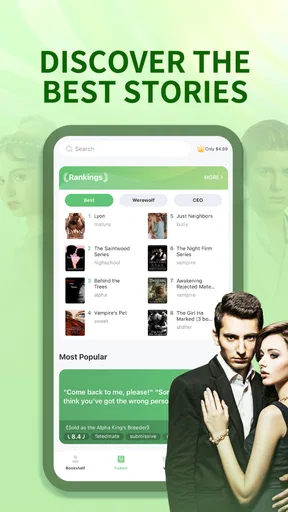
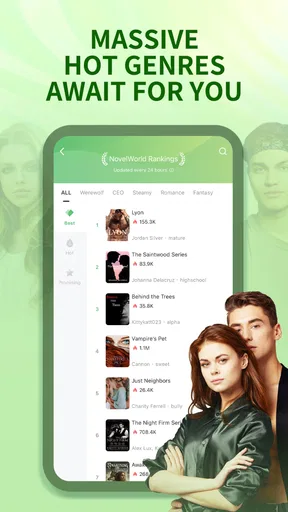
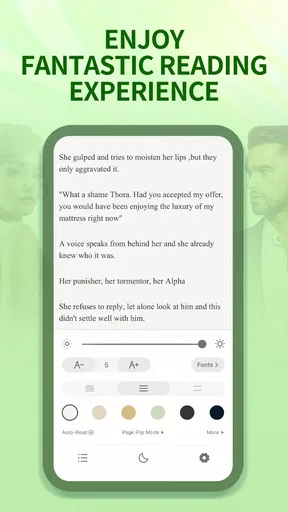
 Analysis by AppCompare
I approached NovelWorld - Enjoy novels as a reading app rather than as a general-purpose bookstore. It belongs to the Books & Reference category, is free to install, and is aimed at adult readers who want a steady stream of popular fiction on a phone. The store summary points toward readers in their twenties through forties, which matches the app’s overall feel: it is built for quick access, regular reading sessions, and discovering one more story when you have a few minutes.
My first impression was that NovelWorld makes the most sense when treated as a habit-based reading tool. I would not choose it as my only place for every kind of book, but I can see its appeal for someone who enjoys serial fiction and likes browsing until a particular plot catches their attention. The experience is less about carefully building a permanent library and more about finding something readable, returning to it often, and keeping several possibilities available.
How I used NovelWorld from the first chapter onward
The simplest workflow is also the most useful: open the app, browse for a story, read enough chapters to decide whether the writing and pacing suit you, then return to that title instead of starting another one immediately. That sounds obvious, but it prevents one of the common problems with discovery-heavy reading apps: collecting many books without finishing any of them.
I found it helpful to judge a novel in stages. The opening chapters tell me whether the premise is interesting, while the next few reading sessions reveal whether the story can hold my attention. I would avoid making a purchase decision based only on an attractive cover or a dramatic description. Serial fiction often takes time to establish its characters, so I prefer to see whether the central conflict develops naturally before committing more of my attention.
The app is especially convenient for short breaks. A commute, a lunch interval, or the last part of an evening can become a small reading session without needing a separate e-reader. That convenience is one of NovelWorld’s strongest points. I can keep a story moving in small portions, which suits readers who rarely have an uninterrupted hour.
At the same time, the phone format changes how I read. I am more likely to skim when a chapter feels slow, and notifications or other apps can pull me away. For that reason, I would use a repeatable routine: open the same title, read a defined section, and stop at a sensible point rather than jumping between recommendations. This makes the app feel calmer and reduces the temptation to browse endlessly.
NovelWorld is developed by HK IReader Technology Limited and has reached over one hundred thousand installs. Its average rating is 2.8 from roughly six hundred ratings, with close to three hundred written reviews. I would treat that rating as a reason to test the reading experience personally rather than as an automatic rejection. Reading preferences vary widely, but the numbers do suggest that the app may not satisfy everyone equally.
Worth Reading Before You Choose

EA SPORTS FC Mobile 26 Is a Bigger Football Game, but It Takes Time

Flipboard Shows What News Apps Must Do Beyond the Feed

Switching to Android Auto Means Rethinking Your Driving Routine

Google Calendar Makes a Crowded Week Easier to Manage

Ludo King Makes the Most of the Minutes Between Plans

Baby Panda World Brings Quick Play to Modern Phones, but Its Game Library Feels Busy
Choosing stories without wasting reading time
My practical advice is to use the discovery area as a sampling shelf, not as a commitment list. When several titles look similar, I would open the one with the clearest premise and read enough to check three things: whether the narration is comfortable, whether the characters are easy to follow, and whether the chapter endings feel earned rather than artificially abrupt.
This approach is more reliable than selecting only by genre label. Two novels can appear to promise the same type of romance, fantasy, or drama while offering very different pacing. If I am reading during short breaks, I want chapters that make progress without requiring perfect concentration. If I am settling in for a longer session, I am more tolerant of slower world-building.
A useful habit is to keep one main novel and one backup novel with a different mood. If the main story becomes emotionally heavy, a lighter alternative can keep the reading routine alive. I would not maintain a large collection of unfinished titles, because the constant choice can become more tiring than reading itself.
Settings and reading comfort worth checking
Before settling into a long session, I would inspect the available reading controls rather than accepting the default presentation. The most important adjustments are the ones that reduce friction: text size, page appearance, brightness behavior, and the way chapters advance. Even a small change can make a phone screen much easier to use at night or in a bright room.
I also recommend checking how the app behaves when you leave a novel and return later. A dependable reading routine depends on being able to resume without searching through the same title again. If a reader regularly switches between devices or reading locations, it is worth paying attention to whether the current chapter and reading position remain convenient to find. I would consider that part of the everyday workflow, not a minor detail.
For evening reading, I prefer a softer screen and a text size that lets me read without leaning toward the display. For daytime reading, stronger contrast can help, particularly outdoors. The best setting is not universal, so I would adjust it once for the environment instead of blaming the novel when the screen feels tiring.
Another small but important choice is whether to read continuously or in deliberate stops. Continuous scrolling can feel effortless, but it can also make it harder to remember where a scene began. I prefer stopping at chapter boundaries when possible. That gives me a natural pause and makes it easier to return later without losing the emotional thread.
Because NovelWorld is rated for mature audiences aged seventeen and over, I would not treat it as a children’s reading app. Parents looking for safe material for younger readers should choose a service designed for that audience and review titles individually. Adult readers, meanwhile, should still remember that the age label describes the intended audience broadly; it does not mean every novel will suit every personal preference.
Faster patterns for regular readers
Experienced users can make the app feel faster without turning reading into a race. My preferred pattern is to decide the next session before closing the current one. I might stop after a chapter ending, remember the title, and return directly to it later. This removes a browsing step and protects reading time from being swallowed by recommendations.
Another useful pattern is to separate discovery from reading. I would browse when I actually want to find something new, then leave the discovery screen once I have chosen. Mixing the two activities often leads to opening several novels and finishing none. NovelWorld works better for me when browsing is an occasional task and reading is the default.
If a story has several early chapters available, I would sample them in one sitting rather than judging the book from a single opening scene. This is particularly helpful with serialized fiction, where the first chapter may introduce a mystery or relationship before the larger direction becomes clear. The trade-off is obvious: sampling takes time, but it saves more time later if the story is not a good match.
I would also keep a simple mental note of why I paused a novel. Was the plot confusing, the pacing slow, or the tone simply wrong for that day? That distinction matters. A book that feels too intense on a weekday evening might be enjoyable at the weekend, while a story with genuinely weak momentum may not improve with a different mood.
For readers concerned about spending, the free entry point makes testing straightforward, but in-app purchases range from $9.99 to $299.99 per item. I would set a personal rule before becoming invested in a long-running story: read enough to confirm that it is a genuine favorite, understand what access a purchase provides, and avoid buying simply because a cliffhanger creates pressure.
This is one of the most important trade-offs in the app. The free installation lowers the barrier to exploration, while the purchase range means an enthusiastic reader needs to stay deliberate. I would never let the excitement of reaching a dramatic chapter replace a clear decision about what I am paying for.
Where the reading experience reaches its limits
NovelWorld is not the obvious choice for readers who want a broad, carefully organized reference library, academic material, or a universal e-book collection. Its identity is closer to an entertainment reading feed than to a traditional library catalogue. Someone who already owns books in several formats may prefer a dedicated e-reader or a library app that brings together titles from established collections.
It may also disappoint readers who want complete control over file formats, annotations, or a highly structured personal archive. I would choose a conventional e-book platform when ownership, portability, and long-term organization matter more than discovering serialized stories. NovelWorld’s appeal is strongest when the reader values immediate browsing and ongoing fiction more than a formal bookshelf.
The rating of 2.8 also makes me cautious about recommending it blindly. I would install it and test the basic reading flow before making it part of a daily routine. That test should include opening a few titles, adjusting the reading view, leaving and resuming a book, and checking whether the pace of recommendations feels helpful or distracting.
Version 10.8.60 is the current version, and the app requires Android 7.0 or later. That makes it accessible to many older Android phones, although compatibility alone does not guarantee that every device will feel equally comfortable for long reading sessions. Screen size, battery condition, and general phone performance will influence the experience as much as the app itself.
iOS readers should make the same practical assessment on their own device before committing to a long reading plan. The important question is not only whether the app opens, but whether the text remains comfortable, the navigation feels predictable, and returning to an unfinished novel takes little effort.
I would skip NovelWorld if I dislike serialized storytelling, strongly prefer books from known publishers, or want a reading environment with minimal commercial pressure. I would also skip it if I am searching for a children’s catalogue because the mature age classification makes it unsuitable as a general family reading recommendation.
Who will get the most from it?
I think NovelWorld suits an adult reader who enjoys trying new fiction, reads in short bursts, and does not mind following stories that unfold over time. It is a good match for someone who often says, “I want something to read, but I do not know what,” because the discovery side can provide a starting point without requiring a carefully planned reading list.
It is also useful for readers who want a low-commitment trial. Since the app itself is free, I can explore the interface and sample the available style of fiction before deciding whether it deserves regular use. The key is to regard the free access as a chance to evaluate the service, not as a promise that every part of a long reading journey will remain cost-free.
For a realistic everyday scenario, imagine finishing work with twenty minutes before dinner. I would open NovelWorld, return to my current title, read one or two chapters, and stop before the session turns into aimless browsing. Later, if the story is still holding my attention, I can continue from the same point. That simple routine is where the app feels most natural: small, repeatable reading rather than a formal book-club experience.
Compared with a library app, NovelWorld is more focused on immediate entertainment and less suited to borrowing a wide range of established books. Compared with a dedicated e-reader, it is more spontaneous but usually less specialized as a long-term reading environment. Compared with a general web search for free novels, it offers a more contained place to browse, but the in-app purchase structure means I would pay closer attention to the route from sampling to continued access.
My verdict after building a repeatable routine
NovelWorld is best approached as a focused fiction companion, not as a replacement for every reading service. I like the idea of using it for regular mobile reading, especially when I want to discover a story quickly and continue it in short sessions. The workflow becomes noticeably better when I separate browsing from reading, adjust the display for the situation, and decide in advance how much time I want to spend.
My recommendation is therefore selective. If you are an adult reader who enjoys popular serialized novels and accepts that in-app purchases can become significant, the free installation is enough to justify a careful trial. Start with one or two titles, test the reading controls, and watch how often the app encourages you to browse instead of read.
If your priority is a permanent personal library, advanced book management, children’s content, or predictable access to established e-books, I would choose a conventional library or e-reader app instead. NovelWorld has a narrower purpose, and it works better when that purpose matches your habits.
After using it with that mindset, I see a service with genuine convenience but a need for reader discipline. The strongest experience comes from returning to a chosen novel, keeping sessions intentional, and treating purchases as decisions rather than automatic steps. For the right reader, that is enough to make NovelWorld a handy part of a mobile reading routine; for everyone else, the alternatives may offer clearer value and fewer compromises.
Pros
- Large selection of novels across multiple genres and reading preferences.
- Clean
- distraction-free interface makes long reading sessions comfortable.
- Personal library helps you save titles and continue reading later.
- Regular content updates provide new stories to discover.
- Adjustable text settings improve readability on different screen sizes.
Cons
- Some novels or chapters may require in-app purchases or subscriptions.
- Content quality can vary considerably between different authors.
- Offline reading may be limited for certain titles or account types.
- The app may display advertisements during browsing or reading.
- A stable internet connection is often needed to sync reading progress.
FAQs for NovelWorld - Enjoy novels
What is NovelWorld - Enjoy novels?
NovelWorld - Enjoy novels is a mobile reading app designed for people who enjoy serialized fiction and digital books. After exploring its interface, the main experience centers on browsing stories by genre, opening a novel, and reading chapter by chapter. The catalog may include romance, fantasy, drama, mystery, and other popular categories, depending on the version and region available on your device.
Is NovelWorld - Enjoy novels free to download and use?
The application can generally be downloaded without an upfront charge, but free access does not necessarily mean that every story or chapter is available at no cost. Some content may be supported by advertisements, in-app purchases, coins, subscriptions, or other unlocking systems. Before reading extensively, users should check the app’s current pricing details, payment terms, and whether automatic renewal is enabled.
Does NovelWorld require an internet connection to read novels?
NovelWorld is primarily designed for online reading, so an internet connection may be needed to browse the library, load book covers, synchronize progress, and open new chapters. If the app offers a download or offline-reading option, availability can vary by title and account status. It is worth checking each novel’s reading controls before relying on the application during travel or without mobile data.
What types of novels are available in NovelWorld?
The selection in NovelWorld may cover several fiction categories, including romance, fantasy, contemporary drama, mystery, adventure, and supernatural stories. The exact catalog can change as new chapters and titles are added or removed. Readers should use the search function, genre filters, rankings, and recommendations to discover suitable books, while remembering that story quality, writing style, and update frequency can differ between titles.
Is NovelWorld - Enjoy novels safe for children and suitable for all readers?
NovelWorld should not automatically be considered suitable for every age group. Digital fiction platforms may contain mature themes, strong language, romantic situations, violence, or other content depending on the individual novel. Parents and younger readers should review the app’s age rating, privacy information, content labels, and parental-control options before using it. Adults should also review permissions and account settings during installation.


